Clean Homebrew Cache on Mac
Last updated: 2026-06-05
Quick answer
Homebrew stores bottles and downloads under ~/Library/Caches/Homebrew. Run brew cleanup -s to remove stale downloads and brew autoremove for unused deps. CodeCleaner includes Homebrew in Dev Caches scan.
Native macOS app. No account required. Local scan. You review before cleanup.
Homebrew caches downloaded bottles and build artifacts. Over months of brew install and upgrade, the cache can reach 2–5 GB — safe to clean with official brew commands.
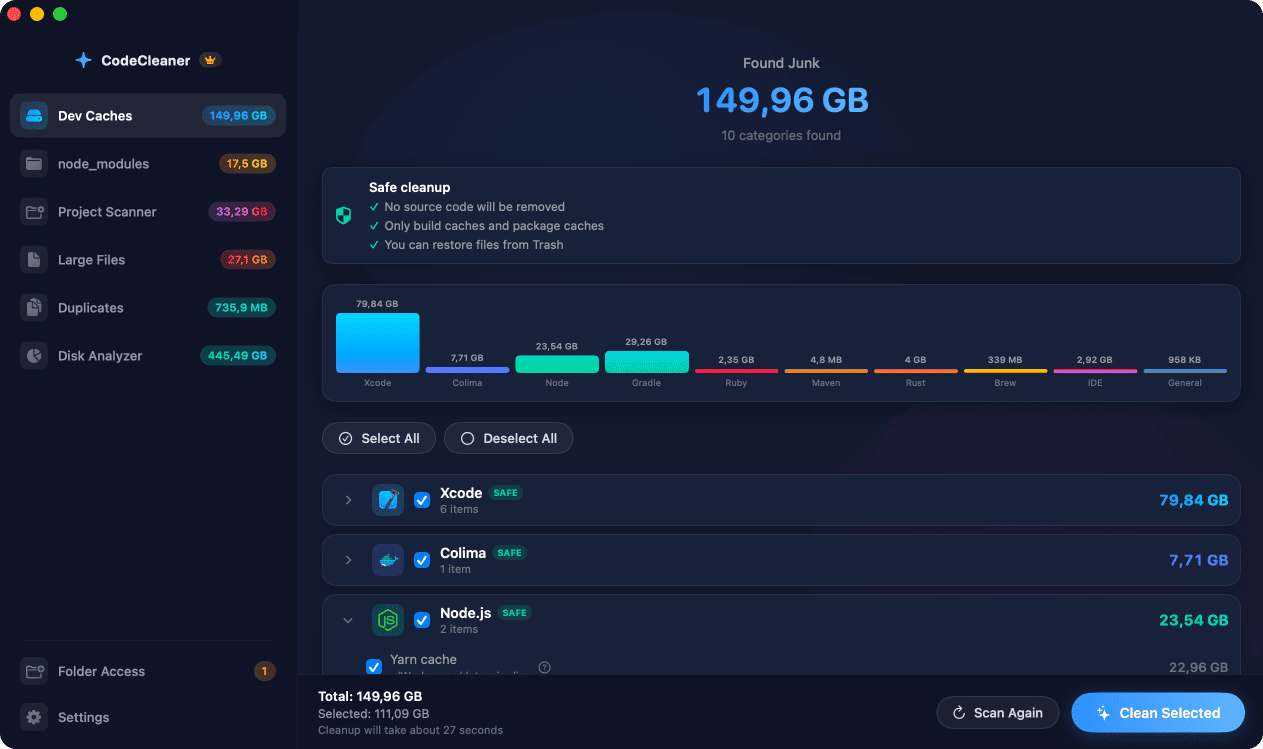
Homebrew cache location
Primary cache: ~/Library/Caches/Homebrew. Old downloads and cached bottles accumulate with every install and upgrade.
Official Homebrew cleanup commands
brew cleanup removes outdated versions. brew cleanup -s also removes cached downloads. brew autoremove uninstalls unused dependencies.
How CodeCleaner detects Homebrew cache
CodeCleaner's Dev Caches module shows Homebrew bottle cache size alongside other developer tool caches.
Manual steps (Terminal)
Run these commands in Terminal first. Scan first, review before deleting — or use CodeCleaner for a visual interface with per-item size breakdowns.
Check Homebrew cache size
du -sh ~/Library/Caches/HomebrewCleanup including cache
brew cleanup -sRemove unused dependencies
brew autoremoveOr use CodeCleaner
CodeCleaner automates this with a native macOS app. Scan first, review before deleting. Free scan, no account required.
Native macOS app. No account required. Local scan. You review before cleanup.
Frequently asked questions
- Is brew cleanup safe?
- Yes. It removes outdated formulae and cached downloads. Installed current versions remain.
Why developers trust CodeCleaner
- Source code is never targeted
- Only known cache and build artifact paths
- Docker cleanup through official Docker CLI
- Local-only processing — no cloud upload
- No account required
- Free scan before paying for cleanup
Native macOS app. No account required. Local scan. You review before cleanup.